# PX4 Integration Guide
> Connect any UAVLAS precision landing system to PX4: MAVLink port parameters, LANDING_TARGET check in QGroundControl and precision landing missions.
---
Site [llms.txt](/llms.txt)
---
> **ULSDC-PBIG161026-PX4** · version 1.0.0 · issued October 16, 2026
> The numbered PDF is the controlled copy: [download it from the portal](https://downloads.uavlas.com).
## Introduction
### Purpose
This guide describes how to connect a UAVLAS precision landing system to a PX4 autopilot, configure the MAVLink port, verify the LANDING_TARGET message and fly a precision landing mission.
### Intended Audience
Integrators and operators setting up precision landing on PX4 vehicles.
### Applicability
This guide applies to every UAVLAS precision landing system that connects to the autopilot over MAVLink: ULS-XCopter, ULS-ProCopter, ULS-Heli and ULS-XSpot. Product-specific installation, pinouts and wiring are in each product's Operation Manual and Interface Control Document.
## Integration
### Preparing for Integration
- Download the latest version of ULS-Tools. Connect all UAVLAS devices to a PC and update their firmware before proceeding.
- Update the autopilot to the latest PX4 version. The stock PX4 firmware supports UAVLAS systems; no custom build is needed.
- Install the transmitter and receiver(s) and wire the receiver to a free autopilot UART (TELEM) port. Pinouts and wiring diagrams are in the Interface Control Document and Operation Manual of your product.
- Configure the transmitter in ULS-Tools.
- Configure the receiver in ULS-Tools (on dual-receiver systems, configure both receivers).
Generation 3 receivers (ULS-Heli-G3, ULS-XSpot-G3) have an RS422 interface. A UART-only autopilot needs the ULS-XX-UART-RS422 onboard adapter.
The system communicates with PX4 over MAVLink 2 and reports the target in MAV_FRAME_LOCAL_NED.
**Example of receiver configuration:**
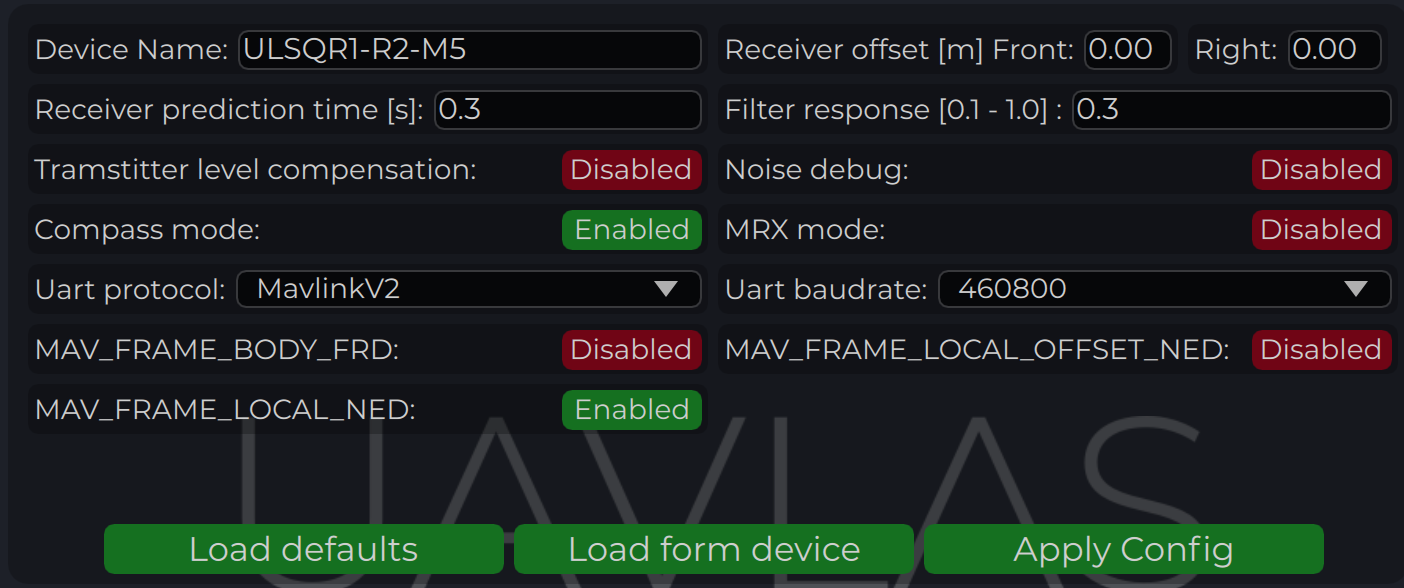
*Figure: Receiver Configuration for PX4*
### Configure PX4 Autopilot
Values are provided as an example (Pixhawk4-mini AP):
| PX4 Parameter | Value | Comment |
|---------------|-------|---------|
| MAV_1_CONFIG | TELEM/SERIAL4 | Requires reboot to apply the next parameters |
| MAV_1_FORWARD | Enabled | Forward MAVLink messages |
| MAV_1_MODE | Onboard | Set link mode to onboard |
| SER_TEL4_BAUD | 460800_8N1 | Must match the UART baud rate set in the receiver configuration |
*Table: PX4 Autopilot Configuration Parameters*
### Running and Testing
After configuration and wiring, power up the drone and transmitter. In QGroundControl, go to **Analyze Tools → MAVLink Inspector** and check for the **LANDING_TARGET** MAVLink message.
If the vehicle is providing a LOCAL_POSITION_NED message to the UAVLAS system and is hovering over the beacon, the field `position_valid = 1` will appear in LANDING_TARGET.
To perform precision landing, create a flight plan and enable the Precision Landing option on the landing waypoint.
LANDING_TARGET may be unavailable when connected over USB. Use a telemetry channel (UART modem, etc.) to connect the drone to QGroundControl during testing.
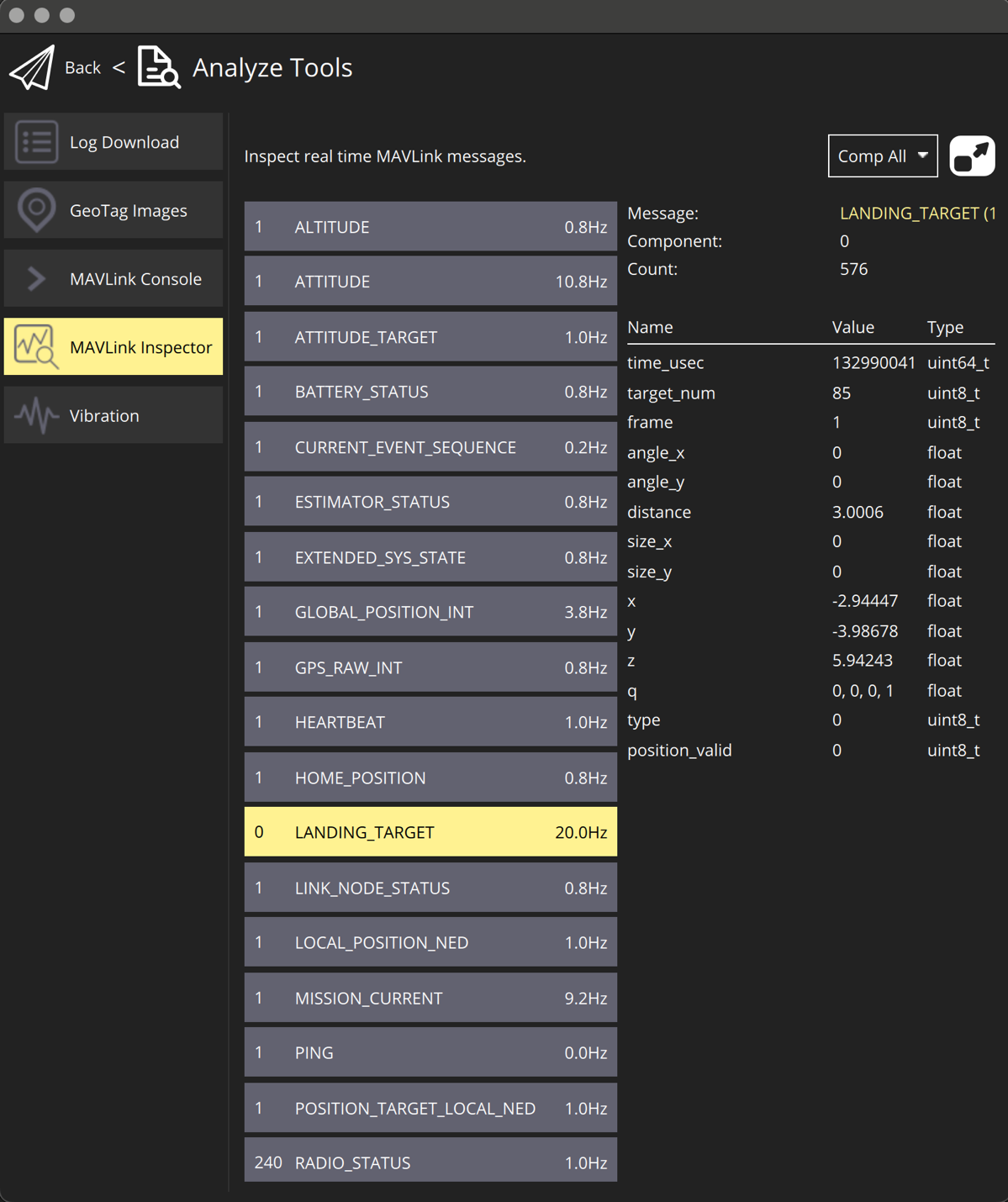
*Figure: LANDING_TARGET Message in QGroundControl*
For additional information, see the PX4 documentation at https://docs.px4.io/main/en/
---